Credits & Billing
CrewLabs Desktop is pay-as-you-go. You add funds to your account, and usage is metered per model call and drawn from your balance as the agent works. There's no subscription and nothing to commit to up front.
Everything below lives on the Credits screen in the app.
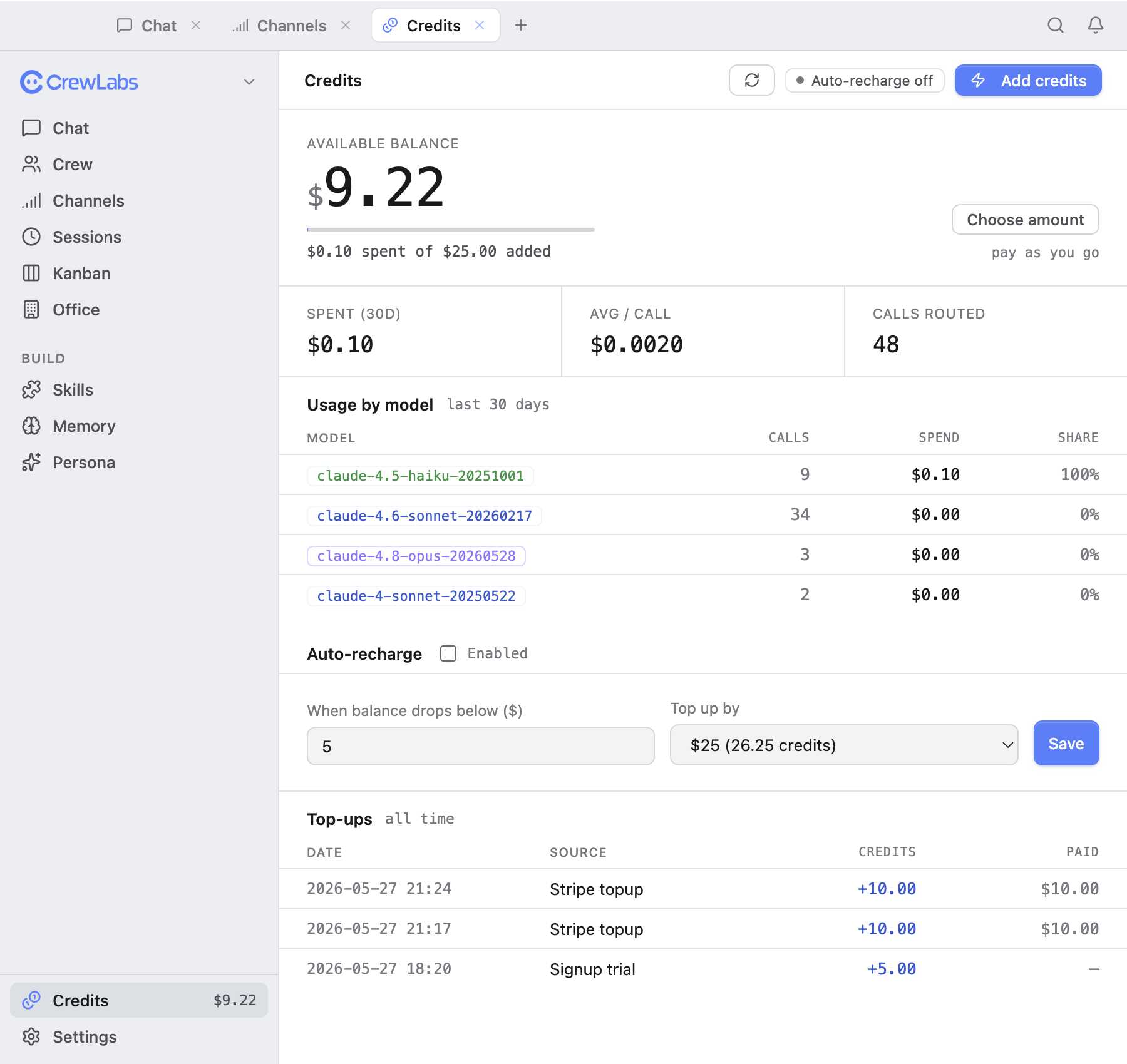
Your balance
The top of the screen shows your available balance — what you have left to spend. As the agent runs, each model call is metered and the cost comes out of this balance. When it runs low, you top it up (or let auto-recharge do it for you).
Spend and calls
Alongside the balance you'll see:
- Spend over the last 30 days — what you've used recently, so you can see your run rate.
- Calls — how many model calls the agent has made in the period.
Per-model usage breakdown
The usage breakdown shows where your spend went, split by model. If you're on Auto, this is where you can see which models the router actually reached for — quick models for the easy messages, heavier ones for the hard ones. It's the clearest picture of what your work costs.
Auto-recharge
Turn on auto-recharge so you never run dry mid-task. You set a threshold and a top-up amount: when your balance drops below the threshold, the app adds the top-up automatically. Leave it off and you'll top up by hand instead.
Top-ups and history
Add funds whenever you want from the Credits screen — funds are added in dollars. The top-up history lists your past additions so you have a record of what you've put in and when.